PyMsgBox Basics
Installation
PyMsgBox can be installed from PyPI with pip:
pip install PyMsgBox
OS X and Linux may require sudo to install the module:
sudo pip install PyMsgBox
PyMsgBox uses Python’s built-in TKinter module for its GUI. It is cross-platform and runs on Python 2 and Python 3.
PyMsgBox’s code is derived from Stephen Raymond Ferg’s EasyGui. http://easygui.sourceforge.net/
Usage
There are four functions in PyMsgBox, which follow JavaScript’s message box naming conventions:
alert(text='', title='', button='OK')Displays a simple message box with text and a single OK button. Returns the text of the button clicked on.
>>> pymsgbox.alert('This is an alert.', 'Alert!')
'OK'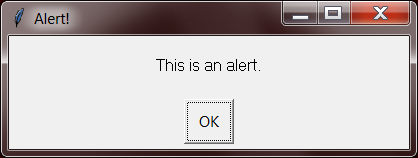
confirm(text='', title='', buttons=['OK', 'Cancel'])Displays a message box with OK and Cancel buttons. Number and text of buttons can be customized. Returns the text of the button clicked on.
>>> pymsgbox.confirm('Nuke the site from orbit?', 'Confirm nuke', ["Yes, I'm sure.", 'Cancel'])
"Yes, I'm sure."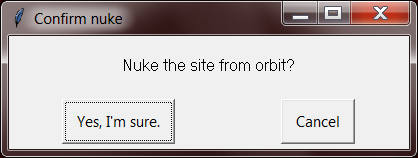
prompt(text='', title='', defaultValue='')Displays a message box with text input, and OK & Cancel buttons. Returns the text entered, or None if Cancel was clicked.
>>> pymsgbox.prompt('What does the fox say?', default='This reference dates this example.')
'This reference dates this example.'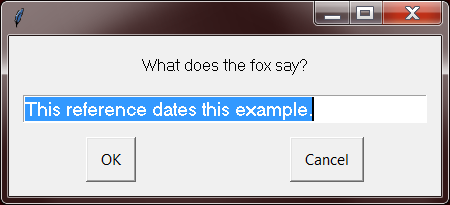
password(text='', title='', defaultValue='', mask='*')Displays a message box with text input, and OK & Cancel buttons. Typed characters appear as *. Returns the text entered, or None if Cancel was clicked.
>>> pymsgbox.password('Enter your password.')
'12345'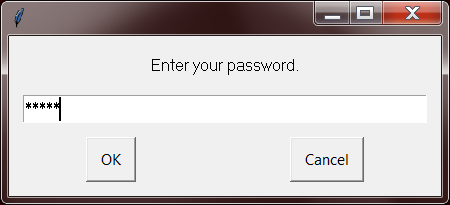
Timeout
All four functions have a timeout parameter which takes a number of milliseconds. At the end of the timeout, the message box will close and have a return value of 'Timeout'.
>>> pymsgbox.confirm('Nuke the site from orbit?', 'Confirm nuke', ["Yes, I'm sure.", 'Cancel'], timeout=2000)  # closes after 2000 milliseconds (2 seconds)
"Timeout"
Localization
You can change the default 'OK', 'Cancel‘, and 'Timeout' strings by changing pymsgbox.OK_TEXT, pymsgbox.CANCEL_TEXT, and pymsgbox.TIMEOUT_TEXT variables respectively.